It's here! I ordered some yarn from Knit Picks a few weeks ago and it arrived yesterday.
I ordered 9 skeins of this lovely pink color in Wool of the Andes (100% wool) in the papaya heather colorway. The plan is to make the Lilas Cardigan (ravely link).
These skeins are only 50 g each so they seem quite a bit smaller than the kind you get at JoAnn;s...but they are super pretty and I think will be great! It's hard to tell in the pictures but there are specks of yellow and pink all the way through - kind of heathered...it's beautiful!
I also ordered some Comfy Worsted (cotton/acrylic) and the colors are stunning! This was the original reason for the order. I wanted some cotton to make a vest for Ben. I'm designing it myself and wanted to use three different colors to make a modern aran type sweater vest. I'll post more about it as I get the design worked out.
Again, these are 50 g balls so they are quite small. I may need to order more to complete the vest.
Yeah for yarn!
♥ Julliana
Wednesday, February 23, 2011
Thursday, February 10, 2011
Cricut 201 Project {Name Chipboard Book} Part 1B
Let's finish designing our Chipboard "Baby" book (or any other word you want)!
Project Steps:
Part 1A - Creating the first page
Part 1B - Completing the design <----You are here
Coming soon:
Part 2 - Cutting the Chipboard
Part 3 - Cutting papers and embellishments
Part 4 - Putting it all together
In this video we'll finish up our digital design by creating the last few pages. We'll look at some issues with fonts and nodes.
Finally, we'll get it ready to cut in Sure Cuts Alot 2.
Post any questions you have in the comments below. I will be posting more over the next few days. Come back often!
♥Julliana
Project Steps:
Part 1A - Creating the first page
Part 1B - Completing the design <----You are here
Coming soon:
Part 2 - Cutting the Chipboard
Part 3 - Cutting papers and embellishments
Part 4 - Putting it all together
We are using Inkscape - a free vector graphics editing software. If you haven't yet, go download it right now!
In this video we'll finish up our digital design by creating the last few pages. We'll look at some issues with fonts and nodes.
Finally, we'll get it ready to cut in Sure Cuts Alot 2.
Post any questions you have in the comments below. I will be posting more over the next few days. Come back often!
♥Julliana
Posted by
Julliana Lund
at
12:54 PM
0
comments
Labels:
cricut,
cricut 201,
hybrid,
scal2,
svg,
tutorials
Wednesday, February 9, 2011
Project Diary: Big Brother Sweater
Project: Big Brother Sweater
Pattern: mine. based on Incredible Custom Fit Raglan.
Yarn: Premier Yarns Everyday Soft Worsted Prints (Color: Winding River)
Needles: US 5 (3.75 mm)
Why you were excited about knitting this project: I wanted to make a sweater for Ben to match James' sweater. I was really excited to learn how to design my own raglan sweater. Starting with a small size made it seem more manageable.
What size you made: To fit Ben (about 2T).
Project Details: I included a one button placket at the neck to accommodate the little man's huge noggin. It does the job, but I wish I would have made it deeper (so it opened bigger) so he could wear it for a longer time. I used 6 rows/rounds of garter stitch as an edging on the neck/sleeves/hem just like James sweater. I like that the yarn did most of the work to make this sweater look interesting.
♥Julliana
Saturday, February 5, 2011
Cricut 201 Project {Name Chipboard Book} Part 1A
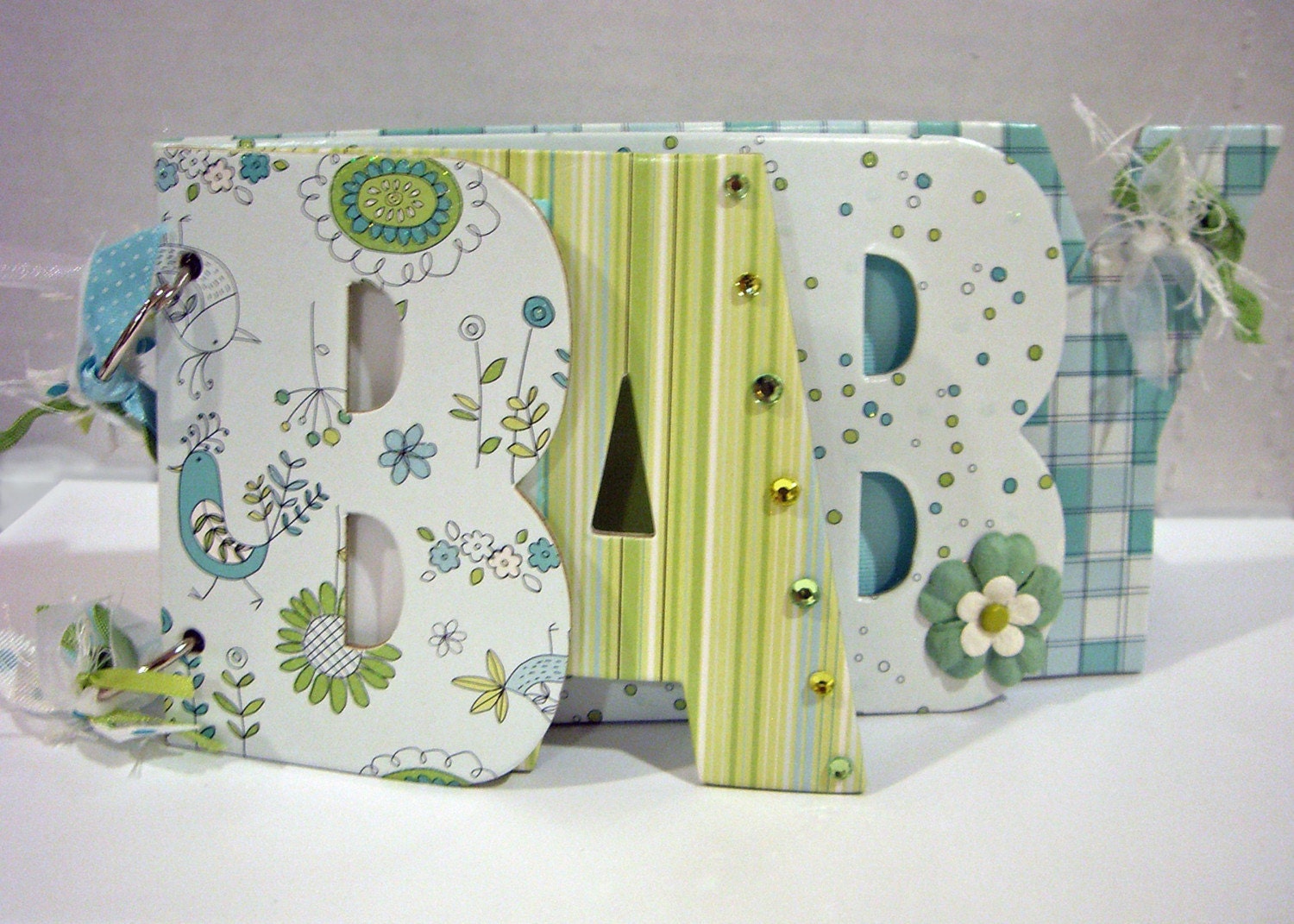
Let's use what we know about file types and create our own letter chipboard book. You can make any word you want, and use any font you want to totally customize it. This will be a multi-part project. In the end, we'll end up with something like this...
or this...
it's up to you!
Project Steps:
Part 1A - Creating the first page <----You are here
Coming soon:
Part 1B - Completing the design
Part 2 - Cutting the Chipboard
Part 3 - Cutting papers and embellishments
Part 4 - Putting it all together
Feel free to post any questions you may have in the comments below. I will be posting the rest of the process over the next few days. Come back often!
♥Julliana
![]() |
| Baby Book |
![]() |
| Friend Book |
Project Steps:
Part 1A - Creating the first page <----You are here
Coming soon:
Part 1B - Completing the design
Part 2 - Cutting the Chipboard
Part 3 - Cutting papers and embellishments
Part 4 - Putting it all together
Let's get started. What you'll need:
- Inkscape - a free vector graphics editing software. It's super useful - go download it right now!
Feel free to post any questions you may have in the comments below. I will be posting the rest of the process over the next few days. Come back often!
♥Julliana
Posted by
Julliana Lund
at
12:07 PM
2
comments
Labels:
cricut,
cricut 201,
hybrid,
scal2,
svg,
tutorials
Subscribe to:
Posts (Atom)